Wi-Fi hotspots in New Zealand, OZ and the Cook IslandsOver 0 locations. Over 24.8 million connections. Easy. Cheap. Reliable.


Coverage at your venue
Although you may want to provide full coverage of your entire venue, and this is certainly ideal, it can cost literally thousands of dollars to do so depending on the size, layout and construction of your premises. While many venues comfortably achieve full coverage using just a single Zenbu wireless router, others may require additional access points, high gain antennas and a large amount of cabling.
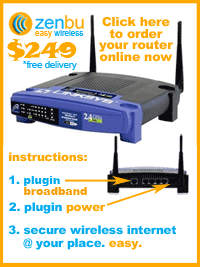
You may find that on balance it is best to simply provide whatever coverage you can achieve from a single Zenbu router positioned as best you can. This does not require electricians, RF engineers and network technicians or any special technical knowledge and costs only $249. Simply connect the Zenbu router to your existing broadband internet connection. Although your entire premises may not be covered, this is the easiest way for you to cheaply provide wireless broadband internet access to your customers. You can always add high gain antennas or additional access points later so you have nothing to lose by starting small and simple.
You might find that most customers don't mind sitting in your reception area, restaurant, lounge or at particular tables to access the internet.
Hints and options
We recommend you contact Go Wi-Fi to discuss different options that are available for increasing coverage. There is also a list of businesses that know our system and can help with the installation of additional equipment below.
The following hints can help you maximise the coverage you achieve with minimal expense. Some of the ideas are easy and cost nothing, some require you to purchase additional hardware. One size does not fit all, but at least some of these hints should help you improve coverage.
- Place your router in a position which minimizes the amount of material it needs to transmit through to reach your users.
If you have a window from which you can see the area you want to cover, place the router near the window. If your customers can see the router they should have no trouble connecting. Bad materials to transmit through are metal, concrete, brick and water. Better materials are dry wood (wooden buildings) and glass. Aluminium foil insulation in walls can be problematic. - Make sure interference from other devices is not causing a problem.
Other wireless devices such as cordless phones, baby monitors, wireless CCTV systems, and even microwave ovens can interfere with WiFi signals. Basically anything that transmits in the 2.4GHz radio band could cause a problem. The most common source of interference is 2.4GHz cordless phones (1.8GHz and 5GHz phones won't interfere), but the worst device we have seen is a wireless CCTV system which when switched on would make the WiFi totally unusable even with the computer only 1 metre from the Zenbu router. Switching off the wireless CCTV system allowed instant good coverage throughout the property.
It's very easy to test for interference if you suspect it is the problem (as long as it is one of your own devices causing the interference!) - just turn the device you think could be causing the problem off and test the WiFi signal. If it is suddenly dramatically improved, you have probably found the problem.
An informative white paper by Cisco regarding interference is avalaible here. - Add additional wireless access points.
You can connect a regular wireless access point to the monitored network port (number 1) of the Zenbu wireless router. This is generally the best way to increase coverage and using this method allows you to position the second access point a distance (up to approximately 100 metres) from the Zenbu router without signal loss like that which occurs with long antenna (coax) cables. The Ubiquiti Nanostation units (also below) are great for this job.
If you want to use more than one secondary access point you can connect a network switch with sufficient ports to connect all the access points (and any other devices you want to connect by cable and monitor) to the Zenbu router's monitored network port and then connect the access points to the switch. Alternatively you may be able to connect additional access points wirelessly to the first one that connects by cable to the Zenbu router's monitored network port. This depends on the capabilities and compatibility of the access points you use and the practicality of such a setup at your premises. - Add external, high-gain antennas in positions which maximise coverage.
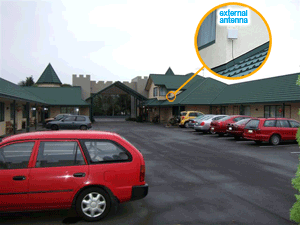
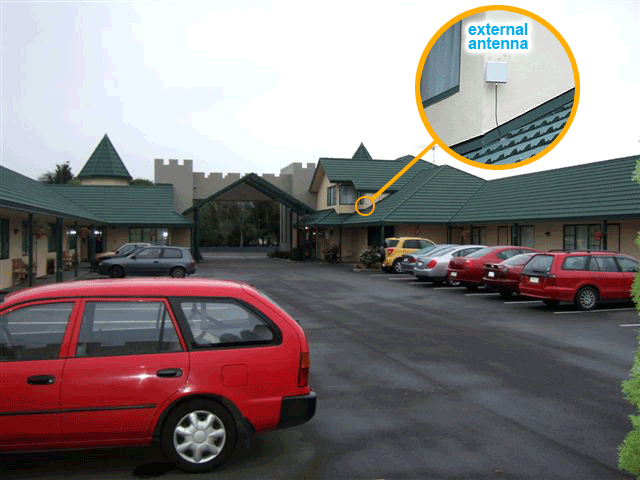
If it is difficult to position the router itself in a location which maximises coverage, you could try adding an external antenna. The standard antennas on the Zenbu router unscrew and can be replaced. Often running a cable from the Zenbu router to an outdoor antenna will be all you need to do to get the coverage you want. It is generally also possible to add a high gain antenna to a secondary access point (see above) to further increase their coverage.
Note that it is generally a better option to use a secondary access point rather than an external antenna. The length of cable running to an external antenna has a significant impact on its performance and may even completely negate any benefit.
[ Some antenna options ]
Please make sure you disconnect the electricity supply from your Zenbu router before you change the antennas. Do not reconnect the power supply to the Zenbu router while antennas are not connected to both terminals. Failure to do this can damage the radio of your router and its ability to transmit and receive data can be severely limited.
Want some help with installing extra equipment?
- Clearvision.net.nz | Nationwide installations
- NeedANerd.co.nz | Nationwide installations and support
- GeeksOnWheels.co.nz | Nationwide installations and support
- Alex Wehweck | Northland region installations and support
- Origin IT | Auckland region installations and support
- Alert Computers | Auckland region installations and support
- Rytech IT | Auckland region installations and IT support
- Pulsar.net.nz | Waikato region installations and support
- Graphics and Computers | Hamilton installations and support
- My Computer Guy | Rotorua/North Island installations and support
- Data Services | Rotorua installations and support
- Scott Communications | Taupo region installations and support
- Tech Express | Palmerston North/Manawatu installs and support
- Computer Corner | Taranaki region installs and support
- Tech Masters | Kapiti Coast region IT support
- Veritas Computer Services | Wellington, Kapiti regions IT solutions
- Compudoc | Greater Wellington region IT solutions
- Quantum Computers | Wellington region installations and support
- NSPIRE IT Solutions | Wellington region installations and IT support
- PC Patch | Wellington region installations and IT support
- Wifi Guys | Canterbury region installations and support
- IT WRKS | West Coast installations and support
- Aerial & Satellite Services | Fiordland/Southland installs and support
- Computer Helpline | South Canterbury installations and support
- TechBox | IT support in Dunedin, Balclutha and Timaru
- Go Wi-Fi | Nationwide online equipment sales
Want to be listed here? Send us an email with your contact and service details and we will add you to the list.
High gain antennas and accessories
An online vendor of accessories that we have used is Go Wifi. They deliver promptly, have an excellent selection of equipment available and are reliable. Please confirm your plans and coverage expectations with them before ordering any additional equipment.
NOTE: We do not sell or install any of the following equipment. However, we have tested most of these products ourselves and can confirm that they are compatible with our routers and can improve coverage significantly. Of course, different equipment types are better suited to different jobs so please think carefully about what you are trying to achieve and the best way to achieve it before you start buying things. The best option for increasing coverage is usually to add a secondary access point which connects to the monitored LAN port of the base Zenbu wireless router.
|
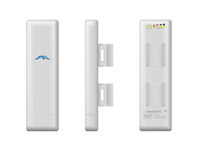
Ubiquiti NanoStation2 NS2 802.11b/g 400mW Outdoor AP/Bridge. The Ultimate 802.11b/g 2.4GHz Outdoor Wireless bridge or CPE for the Global WISP Community. Featuring Adaptive Antenna Polarity (AAP) Technology. This device is very easy to setup and performs very well. We were able to connect to the signal from one of these from 500 metres away through trees, wooden houses and power lines. Because they connect by ethernet cable to the Zenbu router they can easily be mounted outside a long distance away from the Zenbu unit (unlike 'normal' antennas). Power-over-ethernet means only a single ethernet cable goes out to wherever the Nanostation is mounted. |
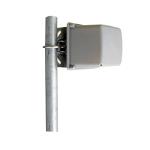
| HG2412P - 2.4GHz 12dBi Mini-Directional Antenna. These antennas offer high gain in an ultra-small package. The antennas are constructed of UV ABS plastic with aluminium back plate and stainless steel mounting bracket. The antenna can be used in Horizontal or Vertical Polarization by making a change to bracket mounting. The stainless steel bracket affords +/- 15 deg tilt adjustment. With its wide beamwidth these make a good sector antenna. This is a popular directional antenna (sends the signal in one direction only) which has a relatively wide beam. This antenna requires an N-Male to RP-TNC Male cable to connect it to the Zenbu wireless router. It is generally preferable to use a secondary high gain access point such as the Ubiquiti Nanostation. |
|
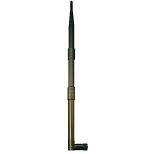
2.4 GHz 9dBi RP-TNC Rubber Duck Antenna. To replace standard detachable 2.2dB antenna on wireless access points. Gives up to 50% more coverage. With Standard Reverse Polarity TNC Male connector (RP-TNC Male). These antennas replace the stand antennas which come with the Zenbu wireless router. Simply unscrew the standard antenna and screw these onto the Zenbu wireless router in their place to improve your coverage. It is generally much better to use a secondary high gain access point such as the Ubiquiti Nanostation. |
|
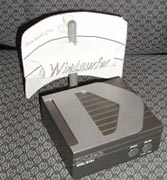
Free 'Windsurfer' antenna (and others). This and many other antennas can easily be made with very cheap materials, often things which people already have in their home. www.freeantennas.com provides templates and instructions for making many antennas on their website. If you are so inclined, trying out antennas you make yourself could prove quite satisfying and provide a great solution at very little cost. |